NARRATION ASSISTANT
From first readto final take
Narration software built around your script — for audiobook narrators, voice-over artists, authors, editors and anyone preparing or recording a script.
One screen. One window. One click. One take.
Website currently under construction. Please check back soon for more information and updates.
TWO MODES
From preparation to performance
Before you record, Annotation Mode gives you a dedicated space to read through your script, mark it up and prepare your performance while the original script remains untouched.
Editors and rights holders can also use Annotation Mode to give directions and add audio or written notes for the performer.
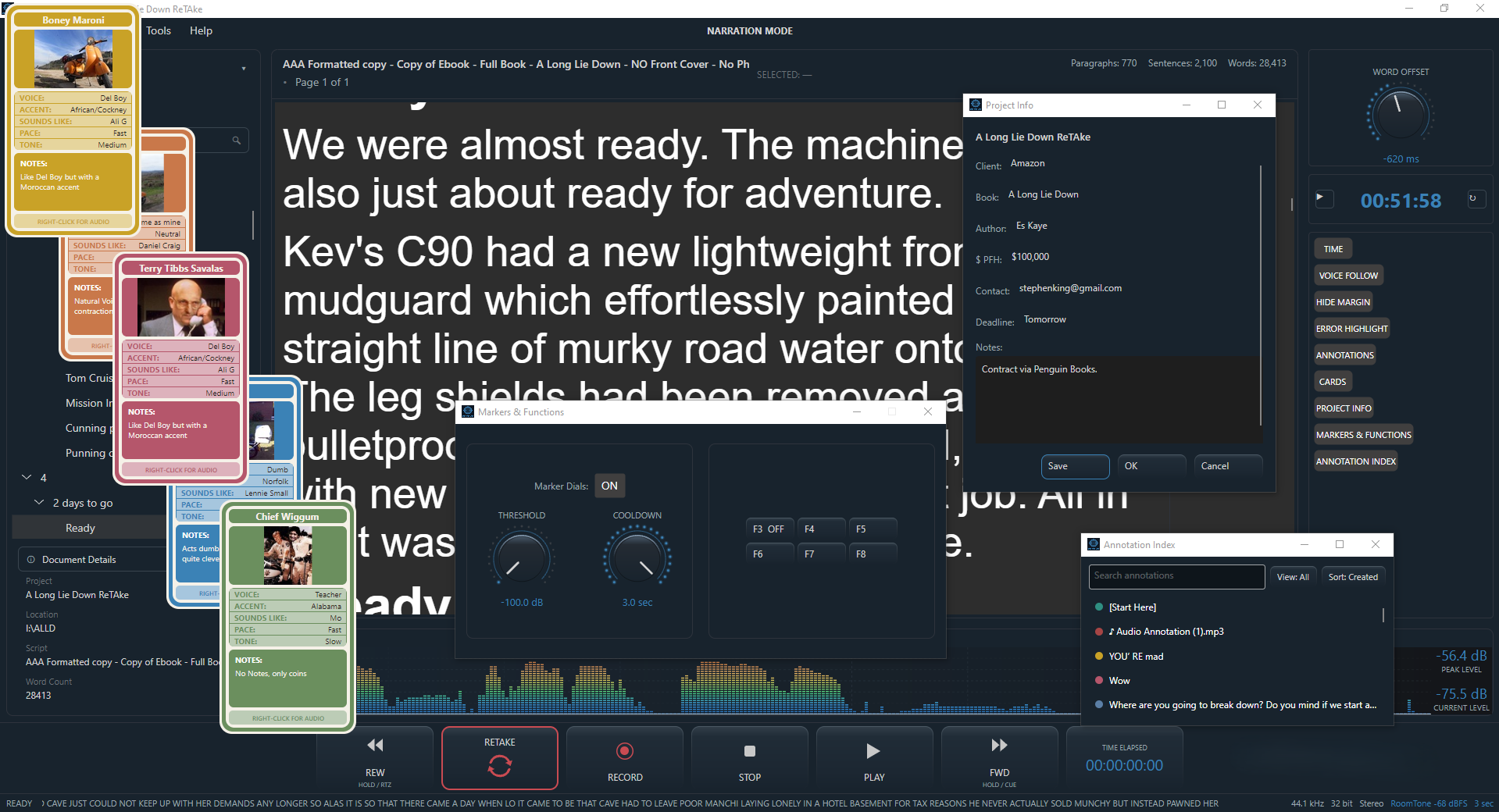
Narration Mode provides a focused workspace for following the manuscript while you narrate. Prepare your DAW as usual. Drag and drop a text document into ReTake. Confirm your place in the script. That's it. Start narrating. You don't even need to hit record, it will start automatically if you prefer.. Or you can do it the more traditional way, by hitting the record button.
For voice-over artists recording lots of short scripts, it's super fast. Just drag and drop the next script into the same window and start recording immediately. Then repeat.
Each mode can be used on its own, or you can switch between the two within the app as your workflow requires.
WHEN YOU NEED IT
Retake and Recovery
Hands-free punch and roll!? Are you kidding me? No, we're not kidding. Here's the usual workflow for many of us. You fluff a line. Normally that means stopping, finding your place in a waveform, scrolling or clicking back to the right spot. Some prefer to use a click and edit everything later. Both methods are pretty good, and for many years it's pretty much been the only way for most people. ReTake gives you an alternative. Now, you can press just one button. One click. No rewinding, no more clicking around. It's so fast, you will barely stop narrating. And you can even do it hands-free by hooking up a MIDI device.
See “The Future of Narration” to read about the truly, fully-automated recovery system. No need for any physical interaction! Totally click free. ReTake notices a mistake and at a given moment, starts a punch and roll sequence automatically. This has already been developed and is currently being rigorously tested. If you’d like to be a BETA tester, get in touch.
BUILT AROUND NARRATION
Everything you need to stay in the flow
Use auto-tracking Voice Follow. Highlight deviations from the script. Built-in transport controls. Connect MIDI devices to work hands-free. Create shortcuts using custom macros, and quickly locate the exact point you need in your audio and script.
WHATEVER YOU'RE NARRATING
From text. To take
ReTake is for anyone performing from a prepared script and needs to turn it into a performance. Audiobook narrators, voice-over artists, actors learning lines, authors preparing scripts for actors, documentary makers, e-learning creators, YouTubers, podcasters, lecturers, teachers, students, presenters, trainers and anyone recording from a prepared script can use the same focused workflow.
WATCH RETAKE IN ACTION
From first read to final take
See how ReTake brings the narration workflow together around the manuscript. From importing your script and following your performance to recovering from a mistake with a single click. See how ReTake's unique one-click Punch and Roll button can benefit narrators and voice over artists.
THE FUTURE OF NARRATION
Work together. Anywhere
ReTake Live - Real-time collaboration for narration sessions. A narrator can record using their local ReTake installation while a director, producer or client follows the same script remotely, sharing the manuscript, the current position, and the ability to send navigation or ReTake commands. The narrator's local ReTake installation stays connected to the local DAW and remains in control of recording and retakes.
In the studio - A producer follows the narrator live from the control room and can send them back to a line for a retake.
Across distances - Two narrators can follow the same script and each other's position while recording from different locations.
ReTake Live - is the next planned development stage.
What if a retake could retake itself? Not just the unique one-click punch-and-roll you can already get with the ReTake button, but a fully automated punch and roll - where mistakes are detected, and the retake happens automatically. True hands-free narration. This is already in development and being tested.
NARRATION ASSISTANT
Stay in the story
Thanks for taking the time to explore Narration Assistant. If ReTake looks like the right fit for the way you work, take a closer look or get started today.
Not ready yet? That's fine. You can follow Narration Assistant on YouTube or Facebook, or get in touch if you'd like to ask a question, share an idea, or just say hello.